Hello,
Just writing this post to thank you all for the 10k views and 7k visitors since I started blogging.
Hope that I helped you in any way.

Hello,
Just writing this post to thank you all for the 10k views and 7k visitors since I started blogging.
Hope that I helped you in any way.
Yesterday when I was trying to import a solution I was getting this error:
Cannot insert duplicate key row in object ‘MetadataSchema.AttributeLookupValue’ with unique index ‘NDX_AttrLookupValAttrIdEntityIdCompState’. The duplicate key value is (3343d9f8-8b3b-45de-881f-4501a34e29de, 8, 0, fd140aae-4df4-11dd-bd17-0019b9312238, Jan 1 1900 12:00AM) the statement has been terminated.
After some digging and doing some queries on SQL, I was able to identify the field that was giving me the problem. Some search on the web and I found these posts that helped me:
In this post, it also says a way to remove the duplicate key row, but it is specific to that case, make sure to have a backup and perform this operation in an isolated environment.
https://community.dynamics.com/crm/b/crmpowerobjects/archive/2014/02/24/duplicate-key-row-error-during-upgrade-to-crm-2013
Comment (or remove) the field that is giving the error in the solution and then zips it again and import.
https://www.gittprogram.com/question/847161_errorcode-0x80044150-cannot-insert-duplicate-key-row-in-object-importing-solution-failed-after-upgrade-to-2011.html
Removing the field from the solution allowed completing the import.
Hope this helps!
The other day I was doing a development that would require modifying the query to a determined entity so that the users wouldn’t see some records if the users didn’t have the role for.
After a bit of research, I’ve done this plugin that is very useful to hide the info.
Message: RetrieveMultiple, Pre-Validation
if (context.Mode == 0 && context.Stage == 10 && context.MessageName.Equals("RetrieveMultiple"))
{
	if (context.InputParameters.Contains("Query"))
	{
		if (context.InputParameters["Query"] is QueryExpression)
		{
			if (!UserHasRole(context.InitiatingUserId, "role", service))
			{
				QueryExpression objQueryExpression = (QueryExpression)context.InputParameters["Query"];

				ConditionExpression condition= new ConditionExpression()
				{
					AttributeName = "statuscode",
					Operator = ConditionOperator.In,
					Values = { 2 }
				};

				objQueryExpression.Criteria.AddCondition(condition);
			}
		}
	}
}
Update:
Message: Retrieve Multiple, Post-Operation
In this next example I’m removing information from the columns, in this case, it was the description and subject from Email entity.
Thanks to Aileen Gusni, in this post that she explains how to change a column value, I’ve adapted to my requirement:
IOrganizationService service = localContext.OrganizationService;
var context = localContext.PluginExecutionContext;

if (context.OutputParameters.Contains("BusinessEntityCollection"))
{
	var retrievedResult = (EntityCollection)context.OutputParameters["BusinessEntityCollection"];

	foreach (Entity entity in retrievedResult.Entities)
	{
		if (entity.Contains("description"))
			entity.Attributes.Remove("description");

		if(entity.Contains("subject"))
			entity.Attributes.Remove("subject");
	}
}
I post this simple code, but what I was using was filtering the information from determined security roles, i.e., I was checking if the user had the required security role to view the information.
Hope it helps!
Have you ever had a client that needed a functionality like this and the Dynamics CRM still doesn’t do it?
You can accomplish this with a simple code that you can put in a button in the ribbon.
You can accomplish this with a ASP.NET (if you are On-premise) page or a HTML web resource (Online). For this example I’m using the ASP.NET.
protected void Page_Load(object sender, EventArgs e)
{
	try
	{
		CopyEntity copy = new CopyEntity();
		string newEntityID = copy.CopyEntity(base.Request.QueryString["Id"].ToString(), base.Request.QueryString["user"].ToString());
		string str = ConfigurationManager.AppSettings["Server"].ToString() + @"/" + base.Request.QueryString["org"].ToString() + "/main.aspx?etc=" + ConfigurationManager.AppSettings["EntityType"].ToString() + "&id=%7b" + newEntityID + "%7d&newWindow=true&pagetype=entityrecord";
		base.Response.Write("window.location.replace('" + str + "')");
	}
	catch (Exception ex)
	{
		throw new Exception(ex.Message);
	}
}
When you do copy.CopyEntity, you have a class that you implement the logic to copy the record (query the selected record to get the data of the fields and create a new one) that is selected in the Homepagegrid or Form.
You can have this in a button, that invokes a Javascript that will call this page for example.
function callCopyEntity() {
	var userid = Xrm.Page.context.getUserId();
	var guid = Xrm.Page.data.entity.getId();
	var url = "connection";
	var address = url + guid + '&user=' + userid;
	window.open(address, 'DuplicateEntity', 'menubar=no,resizable=yes,toolbar=yes,location=yes');
}
This is an easy implementation that will allow the user to copy the records easily, which would have to create manually, having to change only the information that finds necessary.
Hope this helps.
Installing Dynamics CRM sometimes can be a pain if you are installing it in a client that has many restrictions regarding the login users and access.
You may face some of this erros when doing and installation.
Commum errors:
– SQLSERVERAGENT service is not running (during installation) – The user that was running the installation didn’t had the correct permissions. Using a domain admin account worked.
– Setupmicrosoft.crm.setup.server.addaspnetserviceaccounttosqlaccessgroupaction failed. Access is denied – the user that was installing CRM had permission of FullControl on the Organization Unit (OU) that was created for this environment but it didn’t had the Delegate Permission. Set that to the user and then it worked fine.
– CRM 2015 Reporting Extension Setup Error – The SQL Server Reporting Services account is a local user and is not supported – This one I had to change the default Service Account (Report Service) and change to Network Service and apply, Closed Setup of the Reporting Extension and Run it again.
There are alot more other problems that might occur, these were the ones that I faced recently and at the end it was installed.
If you need any help, just send a message.
Hope this helps!
Today I took the Microsoft Dynamics CRM Customization and Configuration – MB2-707 exam. I really didn’t had much time to study but went anyway since I had the second shot available too.
We think that customization and configuration exam is the easiest to do since it is about the use of the CRM and it’s administration, something we do almost all the time, but the catch is that we don’t work on everything that the application allow, leaving a gap between what we do on a work day and what the application has.
I’ve passed the exam so the little I’ve study was enough to do it, but don’t leave it to the last day and get your hands on the application to get a better knowledge of it.
Since the new types of exams, with fewer questions, it is more tricky to get the score to pass, but it is doable.
Read the CRM2015_AdministrationGuide.pdf, that will be very helpfull.
Hope this helps!
It’s been a while since my last post. I had this in the drafts but so many things happened these months that I didn’t published, but today I’m going to talk about the exam I took a couple of months ago, Microsoft Dynamics CRM Online Deployment – MB2-706.
Person Vue is now doing the exams for Microsoft certification and are a bit different (the last exam I did was CRM 4.0) now the exams are with less questions and I heard that future exams will have exercises and not only questions like it is today. This means that less questions will have greater weight each time you answer.
I’ve searched for some information about the exam to study and got this post on LinkedIn: https://www.linkedin.com/groups/21231/21231-6015934928036909060, Ruben Pestana Ruiz posts some information that can help.
The other way to study for this exame is to do a trial version instance and test it, portal.office.com configurations, Configure and Manage Email (Email Router, Server Side Sync, Outlook Addin), Upgrade CRM edition and Redeploy, Install and Deploy other client tools (Outlook Addin, phone/table), Manage and troubleshoot CRM deployment and Administer CRM.
Don’t let it to the last day to study, I think it is better to study a little bit every day then everything in one day.
Here are some study materials you can use:
Manage your Microsoft Dynamics CRM Online subscription
Deploying and administering Microsoft Dynamics CRM Online and Microsoft Dynamics CRM 2016
Plan for Microsoft Dynamics CRM Online deployment and administration
Set up and manage phones and tablets
PDF’s
Good luck!
Have you ever had a situation where you want to use a plugin when a state of a record changes, and the logic needed to implement at the end of the code is to set that record again in the same state?
For instance, if you have a plugin registered in the Quote entity, message SetState/SetStateDynamicEntity and when you activate the Quote, the plugin starts. Your logic in the plugin says that is going to search for some records that are Active, put them in Draft state, changing the necessary fields and Activate it again.
What do we get? The infinite loop….
There is always a problem to these types of plugin, but sometimes you need to do it and how can you get around this problem? We can add a bool field, hidden in the form, to validate this operation at the begining of the plugin and when we first run the plugin, we change that field so the next time it tries to run, it will exit the execution.
It is just one more field, that is hidden in the form and maybe it is easier to manage (you need to remember that if is when you Activate, then when you Revise you need to revert the field), but sometimes there are so many fields that maybe it is better not to implement like that (and not so elegant).
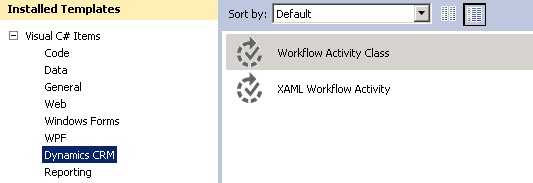
There is another way to do this. You can build a plugin that can be used in a workflow (a workflow plugin), you have the same plugin logic implemented like you have in a normal plugin, but just need to change some of the execution steps of the plugin and how it is registered. If you use the Developer Toolkit for Visual Studio you can do it easily.
1-Create a Workflow Plugin class
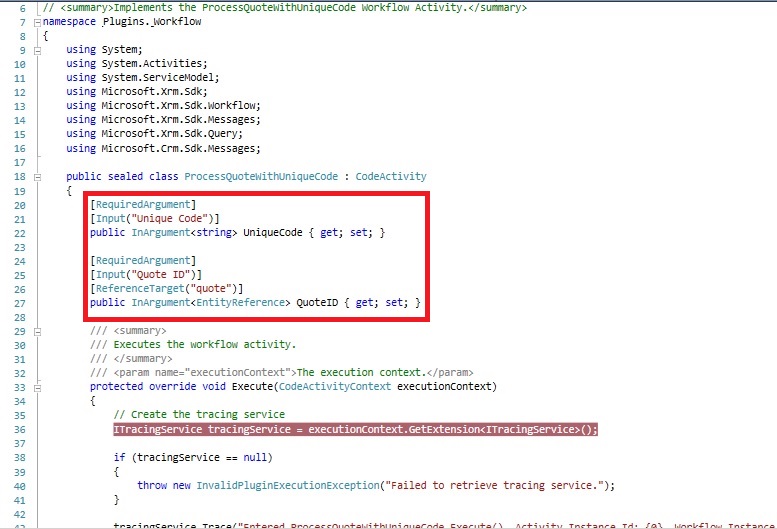
2-Add Input Parameters if necessary
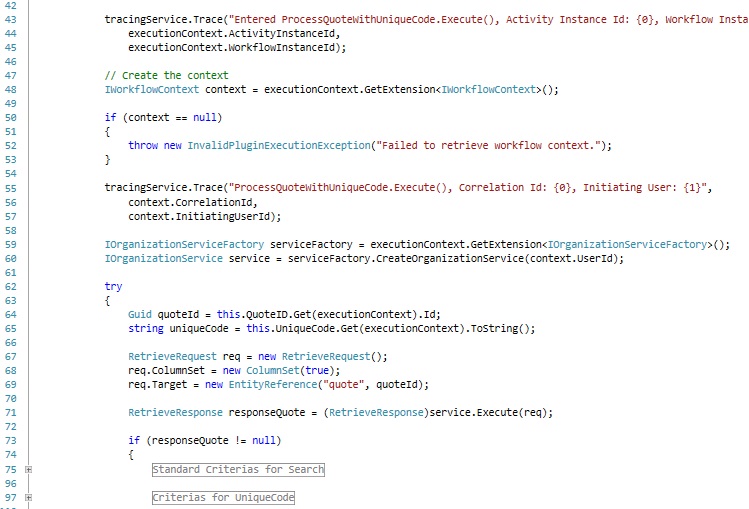
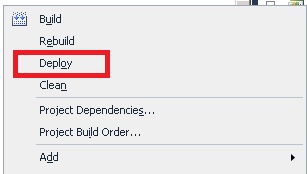
3-Deploy your workflow plugin (if you are using Developer ToolKit, otherwise you register via PluginRegistrationTool)
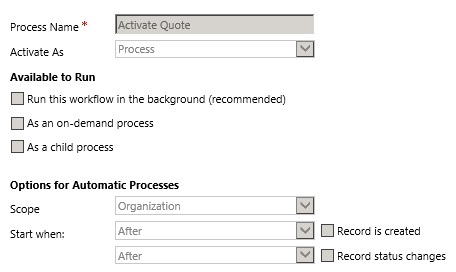
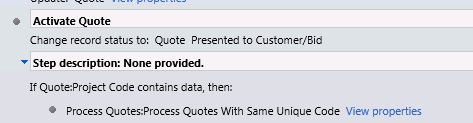
4-Create your workflow – This workflow can run on a changing of a field, changing of status, etc. In our case we had a button that called this workflow to Activate the Quote and then run my workflow plugin
 .
.
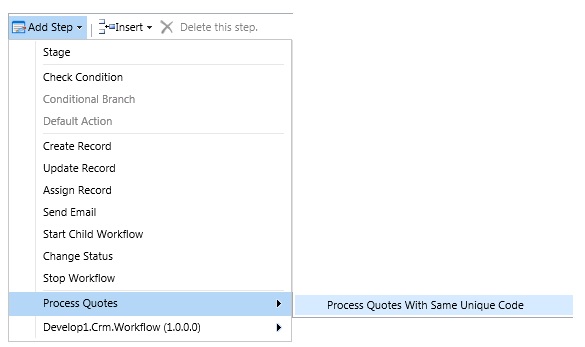
5-Add the step to run your plugin
6-Choose the input – After you have added the step you can insert the input to the plugin
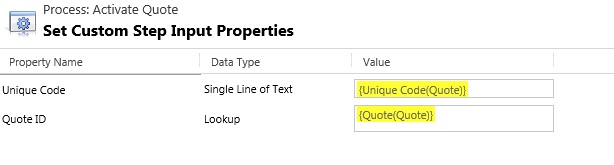
After this, everytime you can this plugin, automatic or via javascript it will run the plugin too.
If you want to just prevent that the plugin goes in an infite loop, you can use Deep property to check if already run.
if (context.Depth > 1) { return; }
Hope this helps.
The other day it was necessary to hide the “+new” button that exists in the Customer field in the Opportunity/Quote, because that button when clicked opens the windows for a new Contact.
I tried to use some javascript code to change the option, instead of, open the Contact, opens the Account, but didn’t work.
So this is a way that can be used to hide that button:
document.getElementById("customerid_i").attributes[19].value = "account:true,contact:false";
Changing the “contact:true” to “contact:false”, does the work.
Hope this helps.
If you need to create an Entity using Javascript, here is a way to do it:
if (typeof (SDK) == "undefined")
{ SDK = { __namespace: true }; }
SDK.SAMPLES = {
_getServerUrl: function () {
var OrgServicePath = "/XRMServices/2011/Organization.svc/web";
var serverUrl = "";
if (typeof GetGlobalContext == "function") {
var context = GetGlobalContext();
serverUrl = context.getServerUrl();
}
else {
if (typeof Xrm.Page.context == "object") {
serverUrl = Xrm.Page.context.getServerUrl();
}
else
{ throw new Error("Unable to access the server URL"); }
}
if (serverUrl.match(/\/$/)) {
serverUrl = serverUrl.substring(0, serverUrl.length - 1);
}
return serverUrl + OrgServicePath;
},
CreateEntityRequest: function () {
var requestMain = ""
requestMain += "<s:Envelope xmlns:s=\"http://schemas.xmlsoap.org/soap/envelope/\">";
requestMain += " <s:Body>";
requestMain += " <Execute xmlns=\"http://schemas.microsoft.com/xrm/2011/Contracts/Services\" xmlns:i=\"http://www.w3.org/2001/XMLSchema-instance\">";
requestMain += " <request i:type=\"a:CreateEntityRequest\" xmlns:a=\"http://schemas.microsoft.com/xrm/2011/Contracts\">";
requestMain += " <a:Parameters xmlns:b=\"http://schemas.datacontract.org/2004/07/System.Collections.Generic\">";
requestMain += " <a:KeyValuePairOfstringanyType>";
requestMain += " <b:key>Entity</b:key>";
requestMain += " <b:value i:type=\"c:EntityMetadata\" xmlns:c=\"http://schemas.microsoft.com/xrm/2011/Metadata\">";
requestMain += " <c:MetadataId i:nil=\"true\" />";
requestMain += " <c:ActivityTypeMask i:nil=\"true\" />";
requestMain += " <c:Attributes i:nil=\"true\" />";
requestMain += " <c:AutoRouteToOwnerQueue i:nil=\"true\" />";
requestMain += " <c:CanBeInManyToMany i:nil=\"true\" />";
requestMain += " <c:CanBePrimaryEntityInRelationship i:nil=\"true\" />";
requestMain += " <c:CanBeRelatedEntityInRelationship i:nil=\"true\" />";
requestMain += " <c:CanCreateAttributes i:nil=\"true\" />";
requestMain += " <c:CanCreateCharts i:nil=\"true\" />";
requestMain += " <c:CanCreateForms i:nil=\"true\" />";
requestMain += " <c:CanCreateViews i:nil=\"true\" />";
requestMain += " <c:CanModifyAdditionalSettings i:nil=\"true\" />";
requestMain += " <c:CanTriggerWorkflow i:nil=\"true\" />";
requestMain += " <c:Description>";
requestMain += " <a:LocalizedLabels>";
requestMain += " <a:LocalizedLabel>";
requestMain += " <a:IsManaged i:nil=\"true\" />";
requestMain += " <a:Label>An entity to store information about custom robots</a:Label>";
requestMain += " <a:LanguageCode>1033</a:LanguageCode>";
requestMain += " </a:LocalizedLabel>";
requestMain += " </a:LocalizedLabels>";
requestMain += " <a:UserLocalizedLabel i:nil=\"true\" />";
requestMain += " </c:Description>";
requestMain += " <c:DisplayCollectionName>";
requestMain += " <a:LocalizedLabels>";
requestMain += " <a:LocalizedLabel>";
requestMain += " <a:IsManaged i:nil=\"true\" />";
requestMain += " <a:Label>Custom Robots3</a:Label>";
requestMain += " <a:LanguageCode>1033</a:LanguageCode>";
requestMain += " </a:LocalizedLabel>";
requestMain += " </a:LocalizedLabels>";
requestMain += " <a:UserLocalizedLabel i:nil=\"true\" />";
requestMain += " </c:DisplayCollectionName>";
requestMain += " <c:DisplayName>";
requestMain += " <a:LocalizedLabels>";
requestMain += " <a:LocalizedLabel>";
requestMain += " <a:IsManaged i:nil=\"true\" />";
requestMain += " <a:Label>Custom Robot3 </a:Label>";
requestMain += " <a:LanguageCode>1033</a:LanguageCode>";
requestMain += " </a:LocalizedLabel>";
requestMain += " </a:LocalizedLabels>";
requestMain += " <a:UserLocalizedLabel i:nil=\"true\" />";
requestMain += " </c:DisplayName>";
requestMain += " <c:IconLargeName i:nil=\"true\" />";
requestMain += " <c:IconMediumName i:nil=\"true\" />";
requestMain += " <c:IconSmallName i:nil=\"true\" />";
requestMain += " <c:IsActivity>false</c:IsActivity>";
requestMain += " <c:IsActivityParty i:nil=\"true\" />";
requestMain += " <c:IsAuditEnabled i:nil=\"true\" />";
requestMain += " <c:IsAvailableOffline i:nil=\"true\" />";
requestMain += " <c:IsChildEntity i:nil=\"true\" />";
requestMain += " <c:IsConnectionsEnabled i:nil=\"true\" />";
requestMain += " <c:IsCustomEntity i:nil=\"true\" />";
requestMain += " <c:IsCustomizable i:nil=\"true\" />";
requestMain += " <c:IsDocumentManagementEnabled i:nil=\"true\" />";
requestMain += " <c:IsDuplicateDetectionEnabled i:nil=\"true\" />";
requestMain += " <c:IsEnabledForCharts i:nil=\"true\" />";
requestMain += " <c:IsImportable i:nil=\"true\" />";
requestMain += " <c:IsIntersect i:nil=\"true\" />";
requestMain += " <c:IsMailMergeEnabled i:nil=\"true\" />";
requestMain += " <c:IsManaged i:nil=\"true\" />";
requestMain += " <c:IsMappable i:nil=\"true\" />";
requestMain += " <c:IsReadingPaneEnabled i:nil=\"true\" />";
requestMain += " <c:IsRenameable i:nil=\"true\" />";
requestMain += " <c:IsValidForAdvancedFind i:nil=\"true\" />";
requestMain += " <c:IsValidForQueue i:nil=\"true\" />";
requestMain += " <c:IsVisibleInMobile i:nil=\"true\" />";
requestMain += " <c:LogicalName i:nil=\"true\" />";
requestMain += " <c:ManyToManyRelationships i:nil=\"true\" />";
requestMain += " <c:ManyToOneRelationships i:nil=\"true\" />";
requestMain += " <c:ObjectTypeCode i:nil=\"true\" />";
requestMain += " <c:OneToManyRelationships i:nil=\"true\" />";
requestMain += " <c:OwnershipType>UserOwned</c:OwnershipType>";
requestMain += " <c:PrimaryIdAttribute i:nil=\"true\" />";
requestMain += " <c:PrimaryNameAttribute i:nil=\"true\" />";
requestMain += " <c:Privileges i:nil=\"true\" />";
requestMain += " <c:RecurrenceBaseEntityLogicalName i:nil=\"true\" />";
requestMain += " <c:ReportViewName i:nil=\"true\" />";
requestMain += " <c:SchemaName>new_customrobot3</c:SchemaName>";
requestMain += " </b:value>";
requestMain += " </a:KeyValuePairOfstringanyType>";
requestMain += " <a:KeyValuePairOfstringanyType>";
requestMain += " <b:key>HasActivities</b:key>";
requestMain += " <b:value i:type=\"c:boolean\" xmlns:c=\"http://www.w3.org/2001/XMLSchema\">false</b:value>";
requestMain += " </a:KeyValuePairOfstringanyType>";
requestMain += " <a:KeyValuePairOfstringanyType>";
requestMain += " <b:key>HasNotes</b:key>";
requestMain += " <b:value i:type=\"c:boolean\" xmlns:c=\"http://www.w3.org/2001/XMLSchema\">false</b:value>";
requestMain += " </a:KeyValuePairOfstringanyType>";
requestMain += " <a:KeyValuePairOfstringanyType>";
requestMain += " <b:key>PrimaryAttribute</b:key>";
requestMain += " <b:value i:type=\"c:StringAttributeMetadata\" xmlns:c=\"http://schemas.microsoft.com/xrm/2011/Metadata\">";
requestMain += " <c:MetadataId i:nil=\"true\" />";
requestMain += " <c:AttributeOf i:nil=\"true\" />";
requestMain += " <c:AttributeType>String</c:AttributeType>";
requestMain += " <c:CanBeSecuredForCreate i:nil=\"true\" />";
requestMain += " <c:CanBeSecuredForRead i:nil=\"true\" />";
requestMain += " <c:CanBeSecuredForUpdate i:nil=\"true\" />";
requestMain += " <c:CanModifyAdditionalSettings i:nil=\"true\" />";
requestMain += " <c:ColumnNumber i:nil=\"true\" />";
requestMain += " <c:DeprecatedVersion i:nil=\"true\" />";
requestMain += " <c:Description>";
requestMain += " <a:LocalizedLabels>";
requestMain += " <a:LocalizedLabel>";
requestMain += " <a:IsManaged i:nil=\"true\" />";
requestMain += " <a:Label>The primary attribute for the custom robot entity.</a:Label>";
requestMain += " <a:LanguageCode>1033</a:LanguageCode>";
requestMain += " </a:LocalizedLabel>";
requestMain += " </a:LocalizedLabels>";
requestMain += " <a:UserLocalizedLabel i:nil=\"true\" />";
requestMain += " </c:Description>";
requestMain += " <c:DisplayName>";
requestMain += " <a:LocalizedLabels>";
requestMain += " <a:LocalizedLabel>";
requestMain += " <a:IsManaged i:nil=\"true\" />";
requestMain += " <a:Label>Robot Name</a:Label>";
requestMain += " <a:LanguageCode>1033</a:LanguageCode>";
requestMain += " </a:LocalizedLabel>";
requestMain += " </a:LocalizedLabels>";
requestMain += " <a:UserLocalizedLabel i:nil=\"true\" />";
requestMain += " </c:DisplayName>";
requestMain += " <c:EntityLogicalName i:nil=\"true\" />";
requestMain += " <c:IsAuditEnabled i:nil=\"true\" />";
requestMain += " <c:IsCustomAttribute i:nil=\"true\" />";
requestMain += " <c:IsCustomizable i:nil=\"true\" />";
requestMain += " <c:IsManaged i:nil=\"true\" />";
requestMain += " <c:IsPrimaryId i:nil=\"true\" />";
requestMain += " <c:IsPrimaryName i:nil=\"true\" />";
requestMain += " <c:IsRenameable i:nil=\"true\" />";
requestMain += " <c:IsSecured i:nil=\"true\" />";
requestMain += " <c:IsValidForAdvancedFind i:nil=\"true\" />";
requestMain += " <c:IsValidForCreate i:nil=\"true\" />";
requestMain += " <c:IsValidForRead i:nil=\"true\" />";
requestMain += " <c:IsValidForUpdate i:nil=\"true\" />";
requestMain += " <c:LinkedAttributeId i:nil=\"true\" />";
requestMain += " <c:LogicalName i:nil=\"true\" />";
requestMain += " <c:RequiredLevel>";
requestMain += " <a:CanBeChanged>true</a:CanBeChanged>";
requestMain += " <a:ManagedPropertyLogicalName i:nil=\"true\" />";
requestMain += " <a:Value>None</a:Value>";
requestMain += " </c:RequiredLevel>";
requestMain += " <c:SchemaName>new_robotname</c:SchemaName>";
requestMain += " <c:Format>Text</c:Format>";
requestMain += " <c:ImeMode i:nil=\"true\" />";
requestMain += " <c:MaxLength>100</c:MaxLength>";
requestMain += " <c:YomiOf i:nil=\"true\" />";
requestMain += " </b:value>";
requestMain += " </a:KeyValuePairOfstringanyType>";
requestMain += " </a:Parameters>";
requestMain += " <a:RequestId i:nil=\"true\" />";
requestMain += " <a:RequestName>CreateEntity</a:RequestName>";
requestMain += " </request>";
requestMain += " </Execute>";
requestMain += " </s:Body>";
requestMain += "</s:Envelope>";
var req = new XMLHttpRequest();
req.open("POST", SDK.SAMPLES._getServerUrl(), true)
// Responses will return XML. It isn't possible to return JSON.
req.setRequestHeader("Accept", "application/xml, text/xml, */*");
req.setRequestHeader("Content-Type", "text/xml; charset=utf-8");
req.setRequestHeader("SOAPAction", "http://schemas.microsoft.com/xrm/2011/Contracts/Services/IOrganizationService/Execute");
var successCallback = null;
var errorCallback = null;
req.onreadystatechange = function () { SDK.SAMPLES.CreateEntityResponse(req, successCallback, errorCallback); };
req.send(requestMain);
},
CreateEntityResponse: function (req, successCallback, errorCallback) {
if (req.readyState == 4) {
if (req.status == 200) {
if (successCallback != null)
{ successCallback(); }
}
else {
errorCallback(SDK.SAMPLES._getError(req.responseXML));
}
}
},
_getError: function (faultXml) {
var errorMessage = "Unknown Error (Unable to parse the fault)";
if (typeof faultXml == "object") {
try {
var bodyNode = faultXml.firstChild.firstChild;
for (var i = 0; i < bodyNode.childNodes.length; i++) {
var node = bodyNode.childNodes[i];
if ("s:Fault" == node.nodeName) {
for (var j = 0; j < node.childNodes.length; j++) {
var faultStringNode = node.childNodes[j];
if ("faultstring" == faultStringNode.nodeName) {
errorMessage = faultStringNode.text;
break;
}
}
break;
}
}
}
catch (e) { };
}
return new Error(errorMessage);
},
__namespace: true
};
Learn by Experience
Microsoft Dynamics CRM 365
Founder & Software Engineer - Creator of the Bookmark Ninja Online Bookmark Manager
Everything Dynamics 365 CE from a technical, architectural and business perspective
Talking about Dynamics CRM, Development (C#, .NET, Javascript), Software and other stuffs
J's Insights on Talent and the overarching Dynamics 365 platform, daily...
Talking about Dynamics CRM, Development (C#, .NET, Javascript), Software and other stuffs
Talking about Dynamics CRM, Development (C#, .NET, Javascript), Software and other stuffs
Talking about Dynamics CRM, Development (C#, .NET, Javascript), Software and other stuffs
It's all about Microsoft Dynamics
Talking about Dynamics CRM, Development (C#, .NET, Javascript), Software and other stuffs
All views and opinions are personal opinions of the Hosk
Links to extensions, tools and integrated applications for Microsoft Dynamics 365 (previously Dynamics CRM)
Everything related to Microsoft .NET Technology
Talking about Dynamics CRM, Development (C#, .NET, Javascript), Software and other stuffs
Talking about Dynamics CRM, Development (C#, .NET, Javascript), Software and other stuffs
The latest news on WordPress.com and the WordPress community.
Talking about Dynamics CRM, Development (C#, .NET, Javascript), Software and other stuffs
 World of an IT guy